

Quick Answer: You can create a forex trading EA without coding by using a no-code platform like EA Studio. Define your strategy rules, generate automated systems using historical data, filter by profit factor and drawdown, then export directly to MetaTrader 4 or MetaTrader 5. No programming knowledge is required at any stage.
Quick Steps:
1. Test on a demo account before going live
2. Register for a free trial at EA Studio
3. Select your symbol and timeframe
4. Set stop loss, take profit, and acceptance criteria
5. Run the generator and review the strategy collection
6. Export your chosen expert advisor to MetaTrader
The idea that building a forex trading bot requires programming skills is outdated. In 2026, no-code tools have removed that barrier completely. Traders who would never sit down with a textbook on MQL5 are now building, testing, and running automated advisors on live accounts, sometimes within their first day of trying the software.
At Algo Trading Space, we’ve been doing exactly this for years. This guide walks through the full process using EA Studio, the platform we use daily and recommend to every trader who asks how to start algorithmic trading without writing code.
Why Coding Is No Longer a Requirement
Not long ago, turning a trading strategy into a working expert advisor meant hiring a developer. You’d describe the logic, wait weeks, review the code, find errors, send it back, and repeat. One single trading robot could take a month and cost significant money. And if the strategy needed adjusting afterward, the whole cycle started again.
That experience is what pushed the Algo Trading Space team toward strategy builders in the first place. Petko Aleksandrov, our founder, went through exactly that process while working for a trading firm coordinating between traders and developers. The frustration was real, and the results were often disappointing even after all that effort.
EA Studio changed the equation entirely. The code step is handled automatically. You define what you want; the software builds it.
What Is EA Studio?
EA Studio is a browser-based algorithmic trading software that lets you create, test, and export expert advisors without any programming background. It runs in a web browser, requires no downloading of applications or installation, and works on any device.
The platform uses historical price data from your broker to generate and backtest strategies. Every expert advisor it produces is exportable with one click as ready-to-use code for MetaTrader 4 or MetaTrader 5. You paste the file into your broker’s platform, compile it, and it’s live.
More than 15 years of research went into building the tools behind EA Studio. It is, I think, the most accessible entry point into algorithmic trading currently available for retail traders.
Quick Steps to Create a Forex EA Without Coding
Here’s the full process in practical terms:
Step 1: Register and Log In
Go to algotradingspace.com/software/expert-advisor-studio and register for the 15-day free trial. No credit card is required to start. Once logged in, the full platform is available with no feature restrictions during the trial period.
Step 2: Open the Generator
The Generator tab is where strategies are created automatically from historical data. Select your symbol (EUR/USD is a good starting point since it has tight spreads and deep liquidity) and choose your timeframe. H1 is reliable for beginners because the signals are less noisy than lower timeframes.
Step 3: Set Strategy Properties
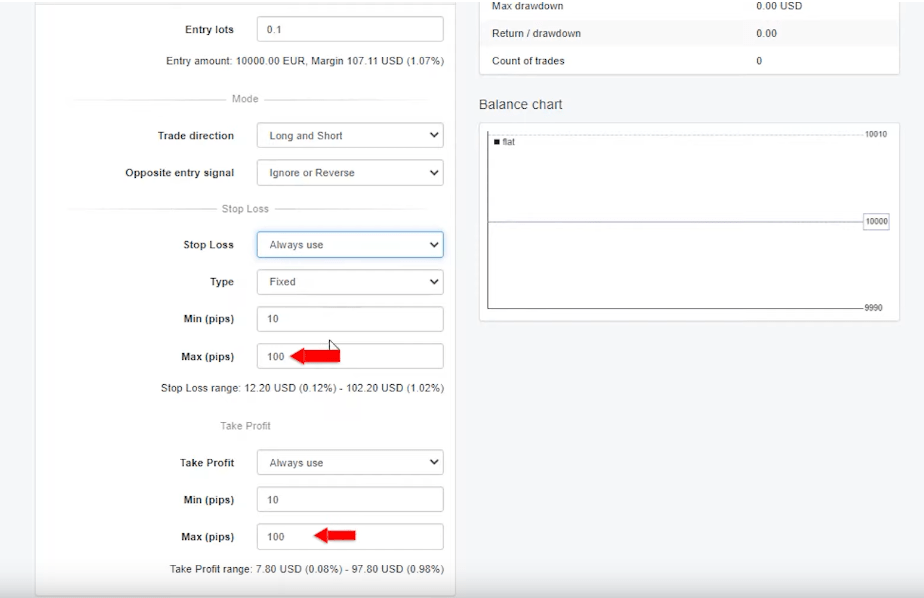
Before running the generator, define the parameters for every strategy it will create:
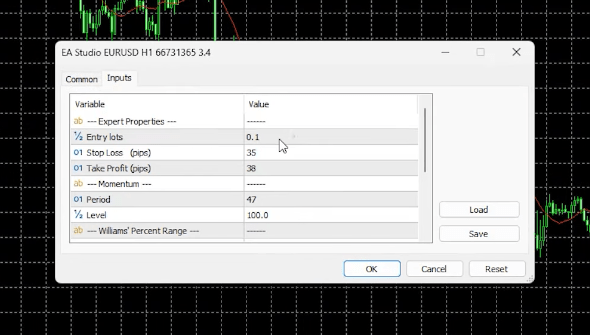
- Entry lots: How much you want to trade per signal
- Stop loss range: Set a minimum and maximum in pips; for example, 10 to 100 pips
- Take profit range: Same format; 10 to 100 pips is a reasonable starting range
- Acceptance criteria: Minimum count of trades (200 is a solid measure of a robust backtest) and minimum profit factor (1.1 means total profits divided by total losses exceed 1.1; anything below that filters out unprofitable systems)
These settings act as a quality filter. The generator only keeps strategies that meet all criteria, which means the collection fills with results that have at least a basic standard of backtested performance.
Step 4: Run the Generator
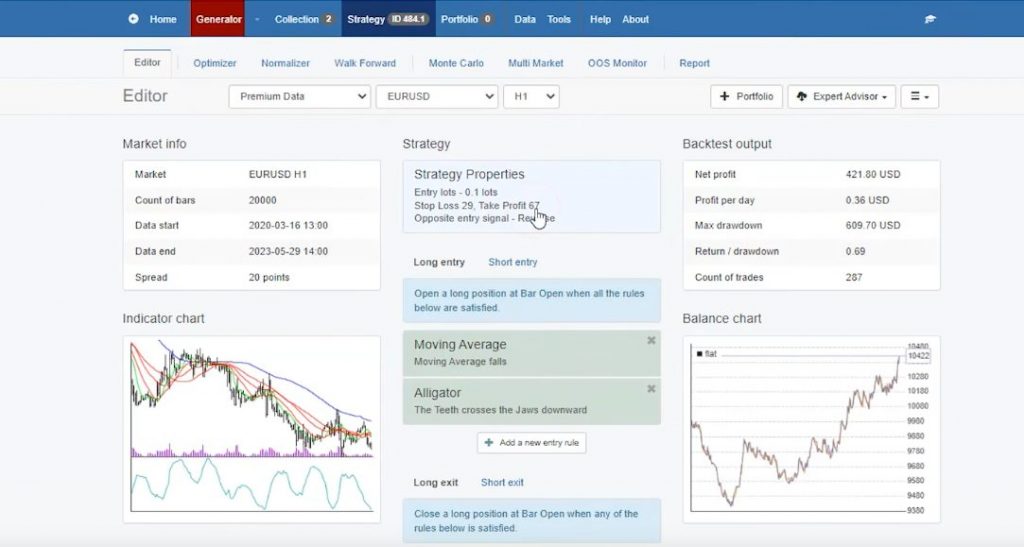
Press Start. The speed is genuinely surprising the first time you see it. Within two minutes of running, EA Studio can generate over a dozen complete strategies, each with its own balance chart, entry and exit conditions, and full backtest statistics. Leave it running longer and the collection grows into the hundreds.
Each strategy in the collection shows:
- A visual balance chart (rising smoothly is good; large spikes or drops suggest instability)
- The indicators used as entry and exit signals
- Stop loss and take profit values
- Key statistics including profit factor and drawdown
Step 5: Filter and Select
Not every generated strategy is worth trading. Remove the ones with obvious problems: large drawdowns at the beginning, jagged equity curves, very few trades. Use the built-in filter tools to narrow the collection further, for example by setting a minimum R-squared value to keep only strategies with consistently upward equity lines.
Pick one or two strategies that look clean, stable, and have backtested over at least 200 trades with a profit factor above 1.1.
Step 6: Export to MetaTrader
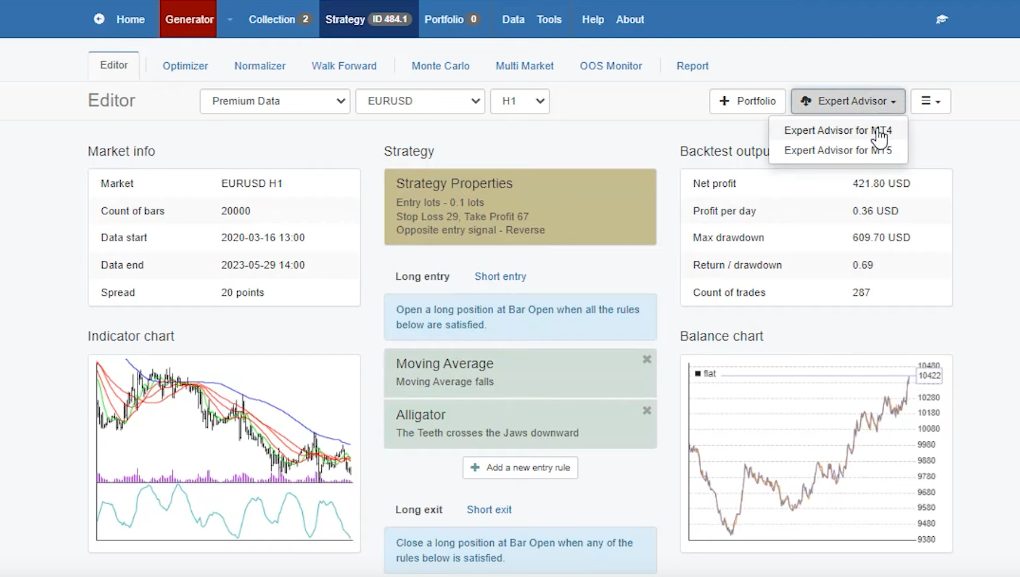
Click the export button at the top of the strategy view. Select MetaTrader 4 or MetaTrader 5 depending on your broker account. The source code appears automatically, compiled and ready.
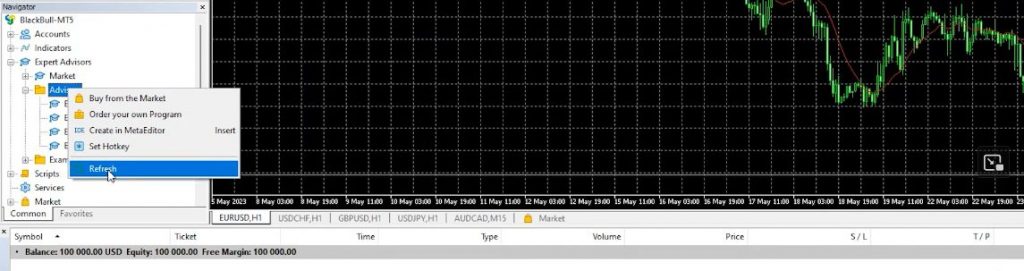
Copy the file, open your MetaTrader platform, go to File, then Open Data Folder, then MQL5, then Expert Advisors. Paste the file there. Double-click it to compile. Refresh the Navigator tab in MetaTrader and the advisor appears, ready to drag onto any chart.
Step 7: Test Before Going Live
Attach the expert advisor to a demo chart first. Watch it run for at least two weeks, ideally longer. Compare the live signals with what the backtest showed. If performance is broadly consistent, move to a small live account. If it diverges significantly, go back to EA Studio and generate alternatives.
What the Generator Actually Does
Behind the scenes, EA Studio runs through thousands of indicator combinations using your historical data. It tests each combination against your acceptance criteria and discards anything that doesn’t meet the standard. What appears in the collection is the subset that passed.
Each candlestick in the historical data contains open, high, low, and close prices. The generator uses all of that information to test whether a given set of entry and exit signals would have produced a profitable trading system over the period tested.
The result is a strategy that was profitable on past data. That doesn’t guarantee future results, and it’s important to say so clearly. What it does mean is that the strategy has a logical, tested basis rather than being a random guess. That’s a meaningful starting point.
Building a Strategy Manually
The generator handles automation, but EA Studio also lets traders build strategies step by step using the manual builder. This approach suits traders who already have an idea they want to test.
Add an entry rule (for example: fast-moving average crosses slow-moving average upward). Add a stop loss and take profit. Add an exit condition if needed. The balance chart updates in real time with every change, so the impact of each decision is visible immediately.
Want to test whether adding a confirmation indicator on a higher timeframe improves the strategy? Add it and watch the chart. If the balance line improves, keep it. If it gets worse, remove it. That feedback loop, instant and visual, is something no amount of manual demo testing can replicate in speed.
This is how many of the free strategies shared weekly on the Algo Trading Space YouTube channel are built. The process is fast enough that a complete strategy can go from blank canvas to exported robot in under fifteen minutes.
Exporting Multiple Strategies as a Portfolio
One feature worth knowing about: EA Studio supports portfolio export. Add several strategies to a portfolio and export them as a single expert advisor. That one advisor then trades all the strategies simultaneously on a single account.
The benefit is a much smoother equity curve. Individual strategies have good periods and bad periods. When multiple strategies run together, their performance tends to offset each other’s drawdown phases, producing a more stable overall result.
This is how professional algorithmic traders manage trading systems at scale, and EA Studio makes it available from the first day of using the platform.
The Free Trial: How to Get the Most From It
EA Studio’s 15-day free trial includes every feature. There are no restrictions on how many strategies you can generate or export. Any expert advisors created during the trial period can be traded for as long as you want after the trial expires, with no limitations on broker or account type.
To get the most from the trial period:
- Open multiple browser tabs and run the generator on different symbols or timeframes simultaneously
- Use the free startup course on the Algo Trading Space YouTube channel to get familiar with the interface quickly
- Export several strategies and test them on a demo account during the same two-week window
- Note which ones produce results consistent with their backtests
The course is linked from algotradingspace.com/software/expert-advisor-studio and covers everything from initial setup to live trading. It’s free and structured specifically for traders who are new to the platform.
A Note on Broker Selection
The expert advisors created in EA Studio work on any MetaTrader-compatible broker. That said, broker conditions matter for performance, particularly spread width and execution speed.
For algorithmic trading, we use and recommend BlackBull Markets and Eightcap at Algo Trading Space. Both offer competitive spreads on EUR/USD and other major pairs, MetaTrader 4 and MetaTrader 5 support, and reliable execution that suits automated trading systems. Testing a strategy built with data from the broker you’ll actually trade on produces more relevant backtest results than using generic historical data.
Key Takeaways
- Creating a forex trading EA without coding skills is fully possible in 2026 using no-code platforms like EA Studio
- The generator creates complete, tested expert advisors automatically based on your acceptance criteria
- Every advisor exports to MetaTrader 4 or MetaTrader 5 with a single click, no programming required
- A 15-day free trial gives full access with no export restrictions
- Strategies created during the trial can be traded indefinitely afterward
- Always test on a demo account before moving to live trading
Frequently Asked Questions
Can you create a forex EA without coding?
Yes. No-code platforms like EA Studio allow traders to build, generate, and export forex expert advisors to MetaTrader 4 and MetaTrader 5 without writing any code.
The software uses historical price data to generate automated strategies based on your defined rules, filters by profit factor and drawdown, and produces ready-to-use expert advisor files with a single click. At Algo Trading Space, we’ve used this process to build hundreds of strategies without any MQL programming knowledge.
Is EA Studio free to use?
EA Studio offers a 15-day free trial with full access to all features, including the strategy generator, manual builder, backtesting engine, and MetaTrader export. There are no restrictions on how many strategies can be created or exported during that period.
Expert advisors built during the trial can be traded indefinitely after it expires. A paid subscription is required for continued access to the platform itself, but the robots you create remain yours with no expiry.
Are no-code trading robots actually profitable?
Some are and some are not, which is why the backtesting and filtering process in EA Studio matters. A robot that passes the acceptance criteria (minimum 200 backtested trades, profit factor above 1.1, reasonable drawdown) has a statistically tested basis.
That doesn’t guarantee future results, but it provides a better starting point than manual strategies with no testing behind them. At Algo Trading Space, we share verified track records of strategies built in EA Studio so traders can see real performance data rather than relying on hypothetical projections.
What is the best software for building EAs without programming?
EA Studio is the recommendation from Algo Trading Space for traders who want to build expert advisors without coding. It’s browser-based, requires no installation, and generates strategies faster than any comparable platform.
The manual builder gives real-time balance chart feedback as you adjust parameters, making it educational as well as practical. A free startup course is available on the Algo Trading Space YouTube channel, and the 15-day free trial covers all features without restriction.
How long does it take to build a forex EA in EA Studio?
The generator can produce a complete, backtested expert advisor in under two minutes. Running it for a standard five-minute session typically produces dozens of strategies in the collection, which can then be filtered and selected for export.
Building a strategy manually using the step-by-step builder takes slightly longer, typically ten to fifteen minutes from adding entry rules through to exporting the final advisor. The total time from registering for a free trial to having a working expert advisor in MetaTrader is usually under an hour for a first-time user.
What indicators does EA Studio support?
EA Studio includes a large library of standard technical indicators including moving averages, RSI, MACD, Bollinger Bands, ADX, Stochastic, Awesome Oscillator, DeMarker, ATR, and many more. Each indicator can be applied across different timeframes, including higher timeframe confirmations on a lower timeframe strategy.
Parameters such as period, applied price, and signal conditions can all be adjusted within the builder. The full indicator list is available in the platform’s built-in help section, which provides detailed documentation for each one.
Do I need a specific broker to use EA Studio?
No. EA Studio exports expert advisors for MetaTrader 4 and MetaTrader 5, which are supported by the large majority of retail forex and CFD brokers globally. The platform also supports importing historical price data from any MetaTrader-compatible broker, which improves backtest relevance.
Algo Trading Space uses and recommends BlackBull Markets and Eightcap for algorithmic trading specifically because of their tight spreads, fast execution, and stable MetaTrader infrastructure, but any regulated broker with MT4 or MT5 support will work.
Can EA Studio strategies be used on a prop firm account?
With caution. Most prop firms allow expert advisors in principle, but apply strict rules around maximum daily loss and overall drawdown limits. EA Studio strategies built using the standard generator settings may produce drawdowns that breach prop firm thresholds, so any strategy intended for a challenge account should be tested specifically against those rules.
Algo Trading Space has a dedicated Prop Firm Robots App with strategies specifically configured for challenge conditions, which may be more suitable than general-purpose generated strategies for prop firm use.
Final Thoughts
Building a forex trading EA without coding is straightforward in 2026. The tools exist, they’re accessible, and the process takes minutes rather than months.
EA Studio is the platform we recommend: browser-based, no programming required, fast generator, real-time visual feedback, and direct export to MetaTrader. The 15-day free trial is the simplest way to test this yourself. Any strategies you build during that window are yours to trade indefinitely.
Start on the demo. Test properly. Go live when the results give you a real reason to.
Further Reading
- How To Trade Forex From Home
- How To Trade Forex For Beginners
- Best Forex Strategies
- Forex Indicators
- Best Currency Pairs To Trade
- Best Forex Brokers
- Best Forex Robots For Trading
- What Is A Magic Number In Forex
- What Does FX Stand For
- Best Forex VPS For MetaTrader
- What Is Forex Algorithmic Trading
- How To Become A Successful Forex Trader

Comments
No comments yet. Be the first to comment!
Leave a Comment
Your email address will not be published. Required fields are marked with *