My account

Strategy Builders · From €190
Expert Advisor Studio

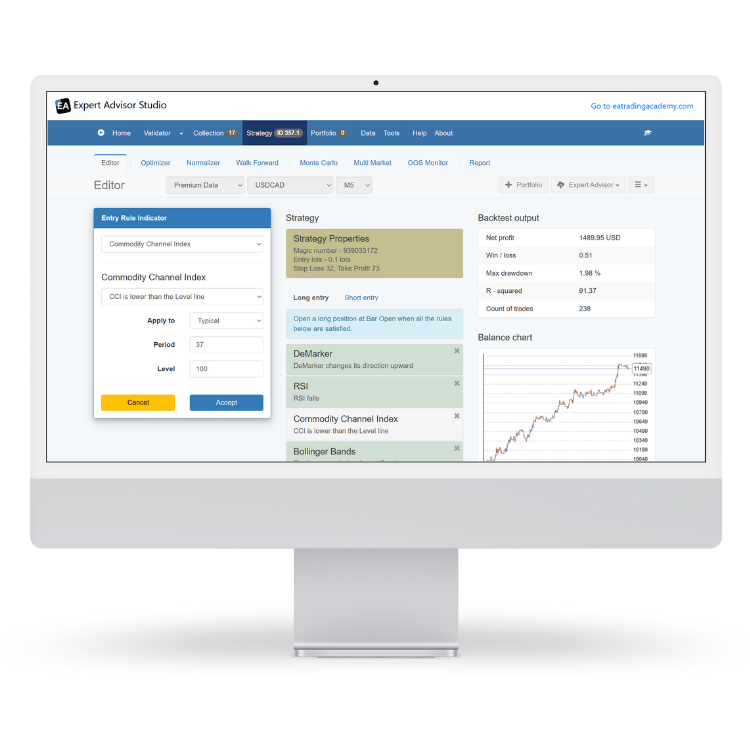
Turn any market idea into a ready-to-trade Expert Advisor in minutes. Generate, test, and export automated strategies for EURUSD, GBPUSD, and 50+ currency pairs without coding.

Expert Advisor Studio · video
Free Expert Advisor Development Course

From €190

Expert Advisor Studio logoStrategy Builders

Expert Advisors generated
850,000+
Countries using EA Studio
127
Daily strategy backtests
50,000+
Years continuous development
12+
Faster than MetaTrader backtesting
10-50x

Reviews · 8

What other traders say about Expert Advisor Studio.

  • I have completed a couple of their courses and found them well structured and highly informative. The software is best of class and I use EA's generated by the software on a regular basis. I highly recommend EA Trading for the learning experience and their products.

    Richard Glanville · South Africa

  • If want to use to try automatic trading,i.e. trading using robots Trading Academy team will help you,check them out ...they are great,their software (which generates robots) works,if you have any issues just let them know,they will help you,their team is great...very responsive and helpful...thanks Trading Academy :-)

    Mihail Mihaylov · Bulgaria

  • I’ve been using the Ultimate Pack for several months now and have nothing but praise for it. The Expert Advisor Studio and Express Generator are tools I regularly utilize to create EAs for both my funded and live accounts. The outcomes have been consistently impressive. I’m looking forward to continued improvements in their offerings

    Alex · Hong Kong

  • Great Product for EA Studio and Express Generator. Lots of learning materials and resources which help me to develop and expand my EA Portfolios

    FT Trader EA · Australia

  • EA Studio is awesome! It creates and text effectively EA's that are working very well. It took me some time to get to know the program and to use it effectively, but definitely, it worth it. The courses are very good, well explained and easy to follow. EA Studio Professional Course is my favorite, as it helped me to deeply understand and effectively use the different tools that EA Studio offers. Also the Forum helped me a lot to make the EA's to finally work properly. Petko, Marin and the staff are very good. They always had been there to answer all my questions and concerns in a professional way.

    R Gonzalez · United States

  • I learned a lot from Petko's classes, especially using EA Studio, which is just unbelievable

    Luis Carlos Getino · Brazil

  • Takes some time to learn EA Studio but very good and reliable tool for generating ea's. The training videos are great for giving clear and simple explanations and types of settings for different assets, along with crucial advice about setting up the EA generator and how to maximize the output EA's

    Gary Smith · United Kingdom

  • The best forex trading tool i have found thus far

    James Makunike · South Africa

From Market Analysis to Live Trading in One Platform

Expert Advisor Studio eliminates the gap between strategy concepts and live trading. While other platforms force you to choose between simplicity and power, EA Studio delivers both. Our lightning-fast backtesting engine processes years of market data in seconds, not hours. The automated Strategy Reactor continuously generates and validates new approaches, giving you fresh trading opportunities while you focus on what matters most - managing your account. Every Expert Advisor exports as clean MQL code that runs natively on MetaTrader without dependencies or third-party libraries.

Everything You Need for Automated Trading

Six core tools that transform manual trading ideas into verified, exportable Expert Advisors ready for live markets.

  • Lightning Fast Backtesting Engine Performance

    Process 6+ years of hourly data in under 30 seconds.

    Read more

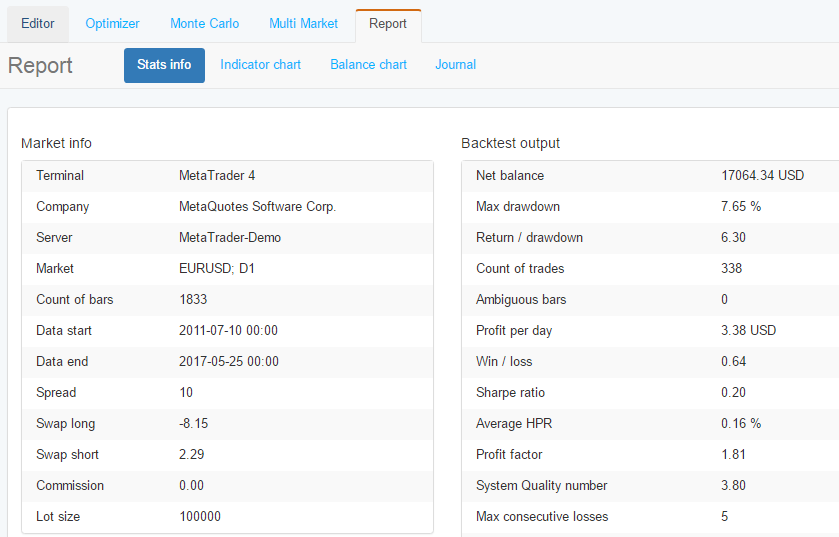
    Process 6+ years of hourly data in under 30 seconds. Expert Advisor Studio's bar-open execution model runs 10-50x faster than MetaTrader's native Strategy Tester, letting you evaluate hundreds of strategy variations in the time it takes to backtest one strategy manually.

  • One Click Expert Advisor Generation

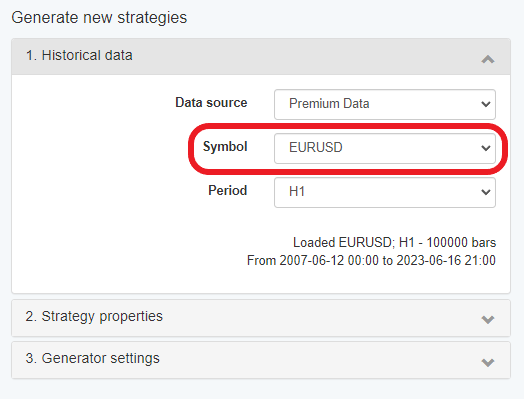
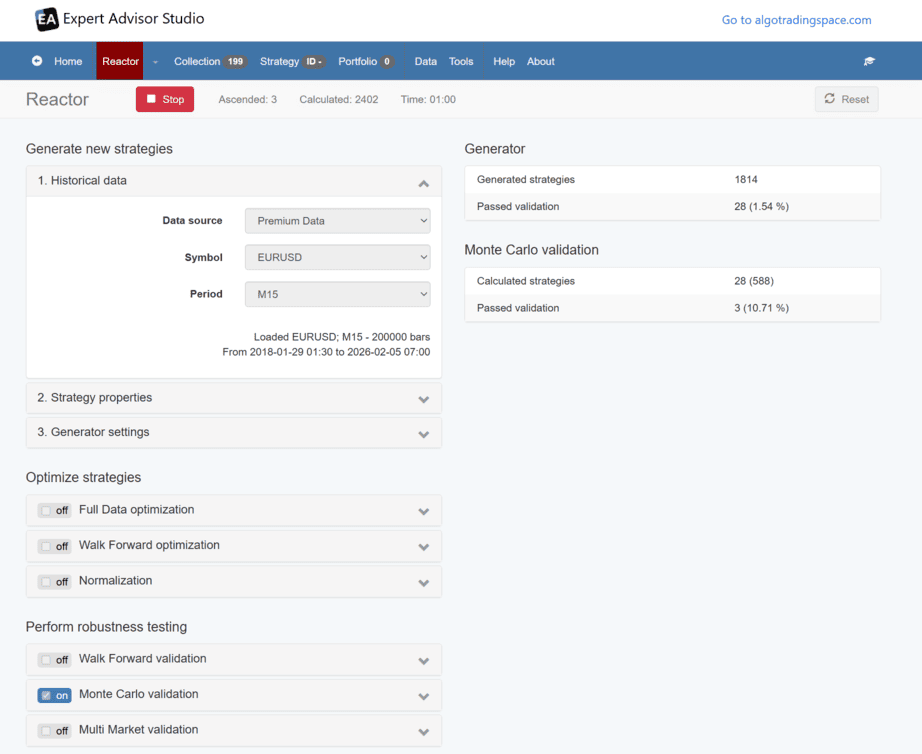
    Set your market and timeframe, click Generate, and walk away.

    Read more

    Set your market and timeframe, click Generate, and walk away. The Generator automatically creates hundreds of unique trading strategies per hour, testing each one against your acceptance criteria. No manual indicator selection, no parameter tweaking, no coding required.

  • Advanced Monte Carlo Robustness Testing

    Run 100-500 randomized simulations per strategy with varied indicator parameters and starting points.

    Read more

    Run 100-500 randomized simulations per strategy with varied indicator parameters and starting points. See the full distribution of possible outcomes instead of one backtest result. Only deploy strategies that remain profitable across 80%+ of Monte Carlo variations.

  • Set and Forget Full Automation

    The Strategy Reactor generates, optimizes, and validates strategies continuously without supervision.

    Read more

    The Strategy Reactor generates, optimizes, and validates strategies continuously without supervision. Set your criteria once, let it run for 24 hours, and return to a complete collection of validated Expert Advisors ready for demo testing. True hands-off strategy development.

  • Multi Market Strategy Validation System

    Test any strategy simultaneously across EURUSD, GBPUSD, USDJPY, and 50+ other instruments in seconds.

    Read more

    Test any strategy simultaneously across EURUSD, GBPUSD, USDJPY, and 50+ other instruments in seconds. Strategies that profit on multiple markets demonstrate genuine edge rather than curve-fitting. Filter for cross-market winners automatically with customizable validation criteria.

  • Clean Native MQL Code Export

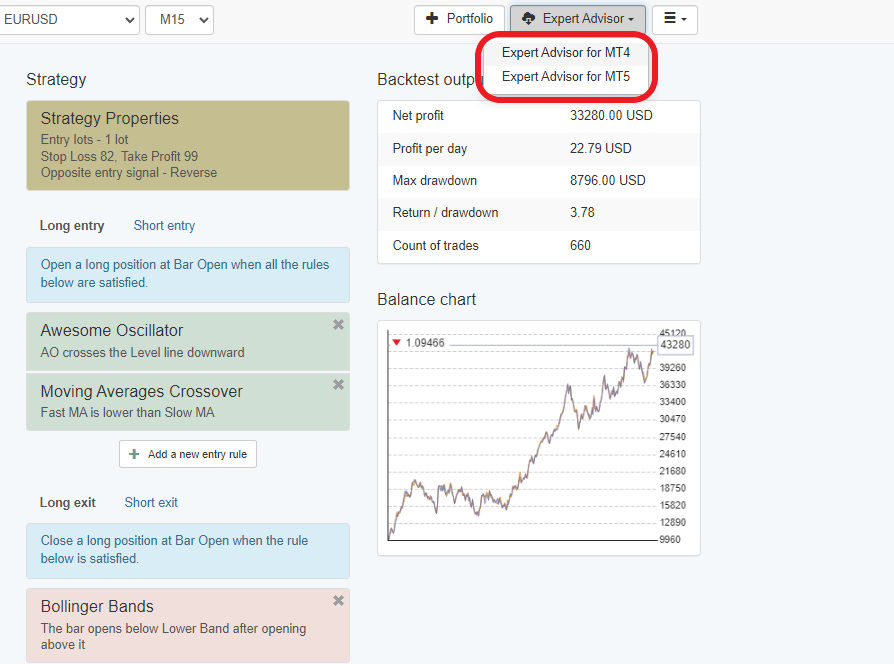
    Export 100% native MetaTrader code with zero external dependencies.

    Read more

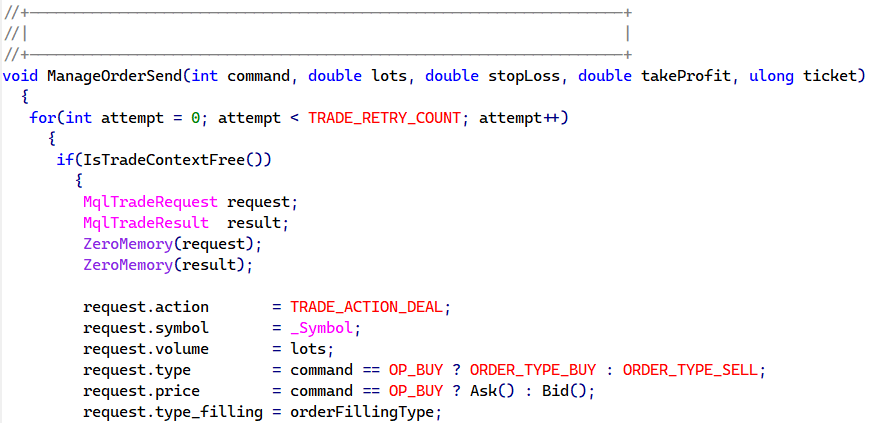
    Export 100% native MetaTrader code with zero external dependencies. No DLL files, no third-party libraries, no proprietary frameworks. The generated MQL4/MQL5 source code compiles without errors or warnings and runs identically on any broker's platform worldwide.

Built For Every Trading Style

Expert Advisor Studio adapts to your experience level and trading goals, whether you're taking your first steps in automated trading or managing multi-strategy portfolios.

  1. Complete Beginners

    No programming background required.

    Read more

    No programming background required. No complicated setup procedures. The Generator handles the technical complexity while you focus on learning which strategies match your risk tolerance. Most new users export their first Expert Advisor to MetaTrader within the first session.

  2. Manual Traders

    You already understand support and resistance, trend following, or mean reversion.

    Read more

    You already understand support and resistance, trend following, or mean reversion. Expert Advisor Studio tests these concepts systematically across thousands of market scenarios, showing you which approaches actually work with statistical backing instead of gut feeling.

  3. Experienced Programmers

    Instead of coding basic strategy frameworks from scratch, you generate the foundation automatically and modify the exported MQL code to add your custom logic.

    Read more

    Instead of coding basic strategy frameworks from scratch, you generate the foundation automatically and modify the exported MQL code to add your custom logic. The clean, well-commented source code exports make modifications straightforward for anyone familiar with MetaTrader programming.

  4. Strategy Researchers

    Run parameter optimizations that would take days in MetaTrader in under an hour.

    Read more

    Run parameter optimizations that would take days in MetaTrader in under an hour. Test strategies across multiple markets simultaneously. Validate robustness with Monte Carlo analysis. Maintain systematic documentation of every strategy variation tested.

  5. Portfolio Traders

    Create separate portfolios for different account sizes, risk levels, or market focuses.

    Read more

    Create separate portfolios for different account sizes, risk levels, or market focuses. The Collection tool helps you track which strategies need revalidation and which ones consistently deliver. Export entire portfolios as single Expert Advisor files for simplified deployment.

  6. Account Managers

    Create customized strategy portfolios based on each client's risk parameters.

    Read more

    Create customized strategy portfolios based on each client's risk parameters. Document every strategy's development process, validation results, and performance expectations. The repeatable workflow ensures consistent quality across all client accounts.

Performance Characteristics and Strategy Framework

Six key aspects that define EA Studio's approach to systematic trading and strategy validation.

  • Lightning-Fast Backtesting

    Bar-open execution model processes 6+ years of data in under 30 seconds

  • Multi-Market Validation

    Test strategies across EURUSD, GBPUSD, USDCHF, USDJPY and more simultaneously

  • Standard MT4/MT5 Indicators

    Uses only built-in MetaTrader indicators for maximum reliability

  • Clean MQL Source Code

    Exports 100% native code with no external dependencies

  • Automated Strategy Pipeline

    Strategy Reactor generates, optimizes, and validates without manual intervention

  • Portfolio Aggregation

    Combine multiple strategies into single Expert Advisor file

From Raw Data to Live Expert Advisor

The complete workflow that transforms market data into validated trading systems.

  1. Setup the Generator

    Select your broker data source, pick your preferred trading asset and timeframe, then run the Generator for at least 60 minutes to build a comprehensive strategy collection.

    Read more

    Select your broker data source, pick your preferred trading asset and timeframe, then run the Generator for at least 60 minutes to build a comprehensive strategy collection.

  2. Configure Data Horizon

    Set maximum data bars to 200,000 or limit analysis to the last 5 years for optimal backtesting scope and reliable historical coverage.

    Read more

    Set maximum data bars to 200,000 or limit analysis to the last 5 years for optimal backtesting scope and reliable historical coverage.

  3. Set Acceptance Criteria

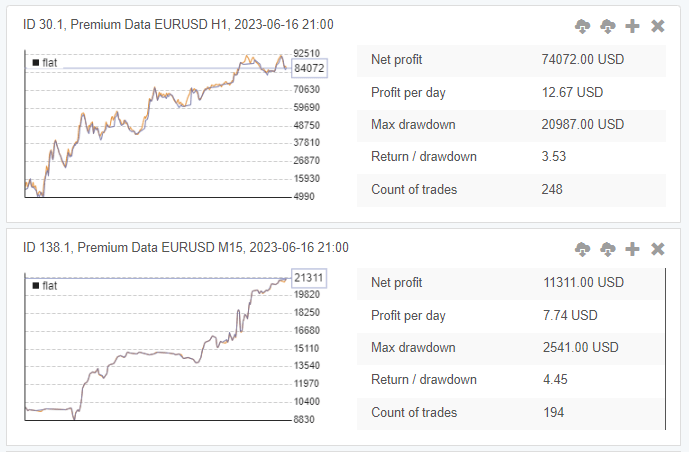
    Establish minimum profit factor of 1.1 and minimum trade count of 200 to automatically filter out unreliable strategies from your collection.

    Read more

    Establish minimum profit factor of 1.1 and minimum trade count of 200 to automatically filter out unreliable strategies from your collection.

  4. Test for Robustness

    Run Monte Carlo analysis with randomized indicator parameters and backtest starting bars to validate strategy stability across different market scenarios.

    Read more

    Run Monte Carlo analysis with randomized indicator parameters and backtest starting bars to validate strategy stability across different market scenarios.

  5. Sort & Filter the EAs

    Arrange strategies in the Collection by R-squared values, with higher numbers indicating smoother equity curves and more consistent performance patterns.

    Read more

    Arrange strategies in the Collection by R-squared values, with higher numbers indicating smoother equity curves and more consistent performance patterns.

  6. Select Your Strategies

    Gradually increase the R-squared threshold until you have at least 10 qualified Expert Advisors that meet your performance criteria.

    Read more

    Gradually increase the R-squared threshold until you have at least 10 qualified Expert Advisors that meet your performance criteria.

  7. Test the Strategies

    Download your validated Expert Advisors and test them on a separate demo account with a different broker to confirm real-world performance before live trading.

    Read more

    Download your validated Expert Advisors and test them on a separate demo account with a different broker to confirm real-world performance before live trading.

Our accounts running Expert Advisor Studio.

The live and funded accounts we run with Expert Advisor Studio. Our Account Tracker reads each one straight from the broker, and the losing accounts stay on the list. The full records, with every trade, are below.

Tracked accounts
12
9 challenge · 2 instant funding · 1 funded
In profit
50%
6 of 12 accounts above their start
Median gain
−0.1%
typical month -0.01%
Average max drawdown
5.6%
median 5.2%
Closed trades
5.8K
combined profit factor 1.00 · 3.7K days tracked
  • under 10%11
  • 10–25%1
  • 25–50%0
  • over 50%0

Risk

How far they fell

Drawdown is the deepest fall from a peak. Each account’s worst one, coloured the same way as on every robot page.

  • Swing9
  • Grid7
  • Intraday7
  • Trend-Following6
  • Martingale3

How they trade

Trading styles

Styles our Account Tracker recognises in each account’s trades. One account can show more than one.

  1. EA Studio Robots+10.10%DD 5.84%
  2. EA Studio Robots+7.96%DD 4.37%
  3. EA Studio Robots+3.74%DD 3.96%
  4. EA Studio Robots-3.23%DD 5.99%
  5. EA Studio NZDCAD H1 1468530611-3.50%DD 6.87%

Spread of outcomes

Best and worst

The top and bottom accounts, so you can read the averages with both in mind.

Every account · Expert Advisor Studio 12

Tracked accounts for Expert Advisor Studio, longest tracked first
EA Studio RobotsTrend-FollowingGridMartingaleChallengeFTMO+1.49%+0.06%11.89%1.021,945726
EA StudioTrend-FollowingGridIntradayChallengeThe5ers+0.51%+0.04%3.27%1.02524424
EA Studio RobotsTrend-FollowingGridMartingaleChallengeHola Prime+3.74%+0.29%3.96%1.17284388
EA Studio RobotsGridMartingaleIntradayFundedFTMO-3.23%-0.26%5.99%0.821,308377
EA Studio RobotsTrend-FollowingGridSwingChallengeHola Prime-0.75%-0.06%7.48%0.95128367
EA Studio RobotsIntradaySwingInstant FundingDarwinex-1.11%-0.09%5.11%0.94374364
EA Studio RobotsTrend-FollowingGridIntradayInstant FundingDarwinex+1.56%+0.17%5.28%1.06630277
EA Studio RobotsTrend-FollowingGridIntradayChallengeHola Prime-1.68%-0.19%2.17%0.86492275
EA Studio NZDUSD H1 1468530611ChallengeHola Prime-0.77%-0.12%4.84%0.9216188
EA Studio RobotsChallenge - PassedFTMO+10.10%+1.78%5.84%2.0328161
EA Studio NZDCAD H1 1468530611ChallengeHola Prime-3.50%-0.57%6.87%0.479144
EA Studio RobotsIntradaySwingChallenge - PassedHola Prime+7.96%+4.82%4.37%1.605249

Expert Advisor Studio Trading Stats

All trading accounts. Check the Algo Trading Space Backtesting & Trading Framework to learn how we manage our accounts.
Total Accounts
10
Total Trades
5,710
Profit Factor
1.00

Trusted By Algorithmic Traders Worldwide

Expert Advisor Studio has powered systematic trading strategies across 127 countries since its launch. The platform processes over 50,000 strategy backtests daily, helping traders transform manual approaches into automated systems.

  • 850,000+

    850,000+

    Expert Advisors generated

  • 127

    127

    countries using EA Studio

  • 50,000+

    50,000+

    daily strategy backtests

  • 12+

    12+

    years continuous development

  • 10-50x

    10-50x

    faster than MetaTrader backtesting

Why Traders Choose EA Studio

  1. Zero external dependencies - uses only standard MT indicators

  2. 100% native MQL code exports compile without errors

  3. Works with any MT4 or MT5 broker worldwide

  4. Complete source code ownership - yours to keep forever

  5. Regular platform updates based on user feedback

Free Expert Advisor Development Course

Master the complete workflow from raw market data to validated Expert Advisor portfolios. Our comprehensive video course covers the methodology professional traders use to build robust automated systems.

Common Questions

Quick answers to help you understand how EA Studio fits your trading approach.

Do I need programming experience to use EA Studio?

No coding experience required. Expert Advisor Studio handles all programming automatically through its Generator and Editor tools. You work with visual interfaces to set trading rules and acceptance criteria, while the platform translates your selections into fully functional MQL code behind the scenes. rnrnThe exported Expert Advisors are complete, professional-grade files that compile in MetaTrader without errors or warnings. If you do have programming knowledge, you'll appreciate the clean, well-structured source code that's easy to review and modify. However, thousands of traders successfully use EA Studio without ever looking at a single line of code.

Which markets and timeframes does EA Studio support?

Expert Advisor Studio supports all instruments available in MetaTrader 4 and MetaTrader 5, including all major and minor forex pairs (EURUSD, GBPUSD, USDJPY, etc.), precious metals (XAUUSD, XAGUSD), oil, indices, and any CFDs your broker offers. rnrnThe platform works with every timeframe from M1 (1-minute) through D1 (daily charts). While you can generate strategies on any timeframe, H1 and M15 produce the most reliable results due to better signal-to-noise ratios and reduced sensitivity to spread variations. The Generator automatically adapts its testing approach based on your selected timeframe and instrument characteristics.

How long does backtesting take compared to MetaTrader?

Expert Advisor Studio backtests strategies 10-50 times faster than MetaTrader's native Strategy Tester. A typical 5-year H1 backtest completes in 5-15 seconds in EA Studio compared to 5-20 minutes in MetaTrader. This speed advantage comes from EA Studio's optimized bar-open execution model and efficient data processing architecture. rnrnThe platform processes years of historical data almost instantly, letting you test hundreds of strategy variations in the time MetaTrader would test just one. Despite the dramatic speed increase, EA Studio maintains statistical accuracy - backtest results match MetaTrader's Strategy Tester within normal variance when using identical data and settings.

Can I test strategies on live market conditions?

Yes, Expert Advisor Studio provides two powerful validation methods beyond standard backtesting. Multi-Market testing runs your strategy simultaneously across multiple currency pairs, metals, or CFDs, showing you whether the logic works across different market conditions or only on the specific instrument where you developed it. rnrnMonte Carlo analysis adds controlled randomization to indicator parameters and backtest starting points, running hundreds of simulated variations to reveal how robust your strategy truly is. Together, these tools let you validate strategies under diverse conditions without waiting months for actual market data. Strategies that pass both tests demonstrate genuine trading edge rather than backtest curve-fitting.

What happens to my strategies after the trial period?

All Expert Advisors you export during your trial remain yours permanently. The MQL source code files are complete, standalone programs that don't require EA Studio to function. They'll continue working on your MetaTrader platform indefinitely, regardless of your subscription status.rnThe only limitation after trial expiration is that you cannot export new strategies from EA Studio until you subscribe. However, any strategies already exported are yours to keep, test, optimize in MetaTrader, and trade with for as long as you want.

Is EA Studio free?

Expert Advisor Studio offers a free trial that includes full access to the Generator, Collection, Optimizer, Editor, and all validation tools. You can create unlimited strategies, run backtests, and explore every feature without time limits. The trial restriction is that you cannot export portfolio Expert Advisors for use in MetaTrader. A paid subscription unlocks Portfolio EA export functionality. All strategies you export during your subscription remain yours permanently, even if you cancel later.

What does an Expert Advisor do?

An Expert Advisor (EA) is an automated trading program that runs on MetaTrader platforms. It monitors market prices continuously and executes trades based on predefined rules without human intervention. EAs can open positions, manage stop losses and take profits, close trades at specific conditions, and operate 24/7 without emotional decision-making. They follow the exact strategy logic you define - whether trend-following, mean-reversion, breakout trading, or any other approach. EAs eliminate the need for constant chart monitoring and ensure disciplined execution.

Is Expert Advisor profitable?

Profitability depends entirely on the strategy logic, proper validation, and risk management. Well-designed Expert Advisors that pass rigorous backtesting, Monte Carlo analysis, and Multi-Market validation can be profitable. However, no EA guarantees profits - market conditions change and strategies require monitoring and periodic replacement. Successful EA trading typically involves running portfolios of 10-15 strategies simultaneously rather than relying on a single EA. Proper validation, conservative position sizing, and systematic portfolio rotation are essential for long-term profitability with automated trading.

Is EA good for trading?

Expert Advisors excel at eliminating emotional trading decisions and executing strategies consistently 24/7. They're particularly good for systematic approaches that require disciplined execution and continuous market monitoring. EAs work best for traders who understand their strategy logic, validate thoroughly before deployment, and maintain realistic expectations. They're not suitable for traders seeking guaranteed profits or those unwilling to monitor performance and replace underperforming strategies. When used properly with sound validation and risk management, EAs can be valuable tools for systematic trading approaches.

What's the difference between EA Studio and Forex Strategy Builder?

Both platforms come from Forex Software Ltd. Forex Strategy Builder Professional is desktop software offering more manual control over strategy creation and detailed parameter adjustment. EA Studio is web-based with powerful automation features like Strategy Reactor that generates and validates strategies continuously without supervision. FSB Pro suits traders who prefer hands-on strategy development. EA Studio fits traders wanting automated strategy generation and faster workflows. Both export clean MQL code for MetaTrader. Many professional traders use both platforms depending on their specific needs.

Can I manage multiple trading accounts with different strategies using EA Studio?

Yes, Expert Advisor Studio is ideal for managing multiple accounts. Create separate Collections for each account or client, organizing strategies by risk profile, market focus, or performance criteria. Export different Portfolio Expert Advisors tailored to each account's requirements. There's no limit on strategies or portfolios you can create. This makes EA Studio particularly valuable for account managers serving multiple clients, traders running personal and family accounts simultaneously, or anyone testing different approaches across separate trading accounts with varied risk parameters.

What percentage of generated strategies actually work in live trading?

Success rates vary significantly based on validation rigor. Strategies exported immediately after generation without validation often show 10-20% live success rates. Strategies passing Monte Carlo testing improve to 30-40% success. Adding Multi-Market validation and 2-4 weeks of demo testing increases success rates to 40-60%. This is why professional traders maintain portfolios of 10-15 strategies - some underperform while others excel, smoothing overall results. The key is systematic validation, conservative position sizing, and regular portfolio rotation rather than expecting every generated strategy to s쳮d.

Do I need a VPS to run Expert Advisors?

A VPS (Virtual Private Server) is recommended but not required. Use a VPS if you want 24/7 automated trading, trade multiple EAs simultaneously, or need guaranteed uptime during important market hours. VPS hosting costs typically $15-30 monthly and ensures your EAs continue trading even when your computer is off. However, for demo testing, part-time trading, or running EAs only during specific sessions, your personal computer works fine. Most traders start testing on their own computer, then move to VPS after validating strategies on demo accounts.

Ready to Automate Your Trading Edge?

Stop manually monitoring charts and start systematically testing your market insights. EA Studio's proven workflow has helped traders transform manual strategies into consistent automated systems. Your first automated Expert Advisor is just minutes away.

Backtest, demo, then a small live account.

That is the order we test our own robots in, and the Account Tracker records every trade along the way. Expert Advisor Studio is one step of it; the other tools cover the rest.